Posts By virtuscareers

Make Your Resume Pop!

Have you applied for a job you really wanted lately, only to be greeted with the disappointing sound of silence from the employer? If you’re applying for jobs you’re qualified to do and not getting anywhere, a fresh look at your resume is in order.

First, it’s important to emphasize the bulk of resume advice is simply opinionand preference. My resume advice is no different. Job seekers often experience frustration when they have three people review their resume because they receive three different opinions (e.g. Your resume should be one page. Your resume should only be two pages. Your resume should only list ten years of work history). And on and on it goes.

I’m going to share excerpts of one of the resume templates I use that’s provided great success for many job seekers. I like to share my tools with people because my amazing mother, Judi, raised me to have an attitude of abundance. Give, and it shall be given unto you.

Keep in mind, different types of roles may call for different types of templates, and some people should use a functional resume instead of a chronological resume. You can do a search on these terms, but, in a nutshell, functional resumes are used when you have gaps in employment, or you’re trying to break into a new field. Chronological resumes are used for people progressing in their chosen field.

The first thing you need to do is create a master resume. A master resume contains everything: all your work history, professional accomplishments, strengths, awards, certifications, education, volunteer work, publications, memberships, training, etc.

When you apply for a specific role, you’ll take elements from the master and tailor a new version of your resume to the opportunity you’re applying for. You’ll want to incorporate the requirements they’re seeking (that are true of you), and your results, skills, and strengths that are most related to the job. Yes, you should tailor a resume to every job you apply for!

Let’s start with the header of your resume. The header is so important, because many people don’t read resumes, they skim them.


You’re probably wondering a few things:

1. Where’s the address?

I never put an address on my client’s resumes because of privacy concerns in these days of technology and, well, Google Earth. Also, you don’t want people tossing your resume assuming you live too far from the job.

2. What about an objective statement?

Sometimes I do use objective statements. It depends. One reason to use an objective statement is when you’re trying to relocate, or transition to a new field. It helps keep people from pigeon-holing you into the city, or career, you’re trying to flee.

However, you should never use a generic objective statement, because it doesn’t add any value. Example:

“Seeking a progressive organization where I can use my skills to contribute to an inventive culture, and continue to grow in my career.”

(Boo)

If you use an objective statement it needs to be specific to the role and emphasize the value you will bring the employer:

“Seeking to serve as an associate photo editor, offering extensive knowledge of digital and film photography and graphic design to contribute to high quality publications.”

A few tips on the header:

  • Your email address should contain your first and last name. It’s professional, it reinforces your name, and it’s easy to remember. If your email isbensmom@somedomain.com, you should set up a free web email account, such as gmail, or yahoo, for your job search. If you have a common name andadamsmith@somedomain.com is already taken, you can try adam.smith, adam_smith, adam.g.smith, or adam_smith71.
  • The Career Profile should be a summary of who you are as a professional. If a manager had nothing else but this paragraph, he/she should be able to tell what your role is, and what your key strengths are.
  • [Update: Big thanks to Susan Osborn for mentioning the LinkedIn profile link in the header, which I’d mistakenly omitted from my screenshot!]

Here’s another example that clearly illustrates a candidate’s background:


Let’s move on to the Professional Experience section.


The critical tip on your experience section is to list results. If you simply list responsibilities, and you’re an accountant, your resume will look like every other accountant. It may even look worse, if they’ve included results.

For example, instead of this:

  • Responsible for reviewing and reconciling vendor invoices

Do this:

  • Excellent investigative and financial skill led to prevention of $100,000 in annual vendor over-payment

Results. Results. Results.

Other sections you may wish to include in your resume, beneath work experience:

  • Education
  • Volunteer and Community
  • Certifications
  • Publications
  • Memberships
  • Awards

There are so many resume tips, I simply can’t include them here without turning this article into a manual. However, I will leave you with one more tip:

Have two fussy and detailed-oriented people proof-read your resume to verify it is error-free. Your resume must be free of grammatical and spelling errors.

Please share your resume tips (e.g. don’t put “References available on request” on your resume) with readers in the comments to increase the value of this post.

All the best to you!​

A Job Exploration and Job Analysis Tool

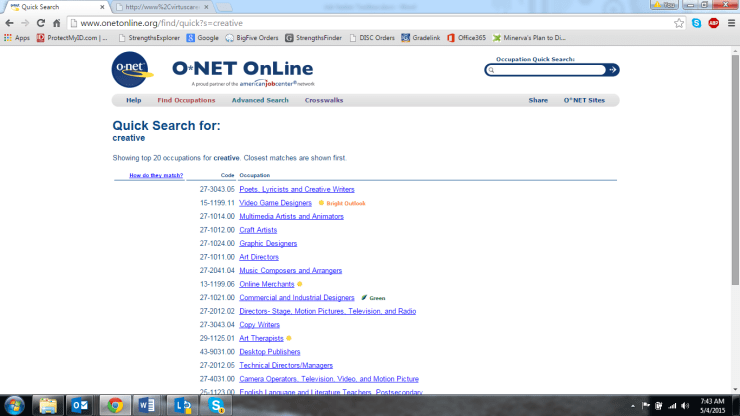
O*NET Online is a great tool for career exploration. You can perform key word searches to identify jobs and careers matching your skills, interests, and strengths. For example, enter “analytical”, “strategic planning”, “process improvement”, “operations management”, “risk management”, “customer experience”, “creative”, “innovation”, etc. and see what returns in a search result.

Clicking the hyperlinked job title in the results provides a wealth of information such as salary, education requirements, outlook for the field (growing or shrinking), competencies used in the role, details about the work environment, and more. There’s also a link at the bottom to review job postings in your desired area.

Here are my results for searching the term Creative:

ONET 1.png

​I selected Video Game Designers, since it has a bright outlook. The detailed information returned for Video Game Designer jobs includes:

  • Sample job titles, typical tasks performed, tools and technologies used in these roles
  • Required knowledge, skills, and abilities for these types of role
  • Details of the work activities performed, and other work environmental variables, such as working with email, indoors, typical work hours, etc.
  • Education and credentials needed
  • The interests, work styles, and values these types of jobs appeal to
  • Wage and employment trends (salary and growth)
  • A find jobs link to view job postings in your desired area

Go to http://www.onetonline.org to start your career exploration or job analysis!

Help! I Hate My Job! (Part 1)

Do you have a serious case of Sunday afternoon dread? That moment you realize tomorrow is Monday, and you have to go to work. Again. To a job you where you feel unfulfilled, bored, or overwhelmed. Chances are, you’re not using your strengths at work.

People who use their strengths at work are happier, more confident, less stressed, produce higher quality work, and are more productive. According to a Gallup poll, 25% of adults use their strengths most of the work day, which means 75% of adults are not leveraging their strengths in a way to achieve and sustain the benefits I’ve listed.

Now, what to do about it? Making a change can seem overwhelming, especially if you want to transition to another field. Many people don’t know where to begin.

These three steps can help you get on track to the work you love and are wired to do.

Step One – Ask yourself the following questions and log your answers:

  1. When was a time I felt energized at work? What was I doing? Take note if you were working with PeopleIdeasThings, or Data. You can select more than one, e.g. People and Data
  2. What made my best job ever, the best job ever? If you’ve never had a best job ever, skip this question.
  3. What kind of activities do I not enjoy doing? (e.g. paperwork, attending meetings, working outdoors, etc.)
  4. What do I want that I don’t currently have? (e.g. I want to work with people, make my own decisions, solve problems, learn something regularly)
  5. Ask others close to you: What positive personality traits and strengths come to mind when you think of me? Log their answers.

Step Two – Think about the kinds of work you might do. Would you prefer:

  1. realistic job where you work with your hands or outdoors? (e.g. firefighter, mechanic, contractor)
  2. An investigative job, where you solve puzzles, research, detect, or experiment? (e.g. police work, scientific research, laboratory technician)
  3. An artistic job that involves being creative, such as writing, photography, graphic artistry, architecture, interior decorating?
  4. social job that involves serving society, such as teaching, social work, counseling, health care, or a minister?
  5. An enterprising job where you would make, sell, and manage a product or service?
  6. conventional job in an office such as management, financial transactions, information technology, etc.?

Step Three – Think about attributes of your ideal work environment. Write down two lists. One list contains things you want in your work environment, the other contains things you don’t. I’ve listed 22 examples of work environment attributes. Add others you might think of:

Autonomy, short training time (e.g. 6 months or less), problem solving, managing others, 40 hour work week, non-standard hours (part-time/evenings/different shifts), routine travel, occasional travel, influencing others, contact with the public, making/fixing things, authority, working outside, working inside, working partially inside and outside, generating ideas, working independently from others, project work (tasks that last a week or longer), work that involves precision/exact standards, creating order, high income, financial challenge (advising others on finances)

Here is an example:

Mary works in regulatory and compliance. Her main duties are running reports and writing documentation, working independently in a cubical. She hates her job. After this exercise, Mary discovers the following:

Mary likes working with people and data. She prefers conventional jobs. Her work environment wants are autonomy, problem solving, influencing others, contact with the public, authority, working inside, generating ideas, financial challenge (advising others on finances). Her work environment do not want list contains: routine travel, working solitary, working outside, making or fixing things, managing others.

With this information, Mary can research conventional jobs working with people and data that have the attributes in her want list. Example jobs Mary might enjoy are financial planner, public tax accountant, or personal banker.

If you take the time to reflect on these three steps, you’re well on your way to curing your Sunday blues. In part two, I share a simple process to assist with decision-making and next steps based on your identified options.

Read Help! I Hate My Job! (Part 2)

All the best to you!

Managing Your LinkedIn Brand

You have a brand, whether or not you’re aware of what it is. If you are a job seeker, striving to get ahead in your career, or looking to attract customers, your brand is your most important asset. Don’t let it shape itself passively!

I am an evangelist of being intentional. Deliberate. Directed. Purposeful.

Prospective employers and customers research you online with the goal of forming an opinion about you. Becoming very intentional with your LinkedIn profile, and activity, is crucial to influencing the opinion they form. LinkedIn activity? That’s right. Your activity, not just your profile, says a ton about you.

Are you “liking” and sharing posts related to workplace drama?

You may be perceived as someone who will bring or attract workplace drama.

Are you “liking” and sharing memes that are not professional, or are ill-suited for an environment such as LinkedIn?

You may be perceived as someone who doesn’t have a sense of propriety. Someone who doesn’t know what behavior is appropriate in various situations and environments.

Sidebar: I’m speaking specifically of posts that are either in poor taste, or in no way related to the world of work, such as a picture of a cat with a caption: “Where is that damn human? My bowl is empty!”

What do your posted comments say about you?
Ideally, you want to be viewed as someone who is constructive, appropriate, positive, professional, and adding value to the network.

What does your picture convey? Does it look like a photo from an online dating site? Can people see your arms in it, posed “selfie” style?
Ask someone to take your picture, or use a camera with a timer. Don’t take your own photo belted in the front seat of your car, wearing sunglasses, or with your arms extended. It’s hard to imagine you in professional dealings when your photo is not professional.

Here are some of the positive messages you could be sending with your LinkedIn activity:

  • This person appears to be interested in big ideas and casting a vision
  • This person possesses technical savvy, or is a subject matter expert
  • This person has a vast range of perspectives and interests
  • This person is engaged with content and communities related to their profession
  • This person posts thoughtful and engaging content
  • This person is a kind, responsible, and mature citizen

When interacting on LinkedIn, before you “like”, post, or share, ask yourself:“Would I want this activity to be the basis of a customer or hiring manager’s opinion of me?”

All the best to you!

One “Must Do” for the Job Interview

Congratulations! Either your resume or a networking contact has landed you a job interview. (Or you like reading interview advice because, hey, you never know).

On average, a person has a 12% chance of a job interview resulting in an offer. One effective way to significantly increase your odds is a technique I call role mapping. If you adopt this technique, you’re highly likely to be more prepared than other candidates. (Note: there are dozens of interview prep tips you can and should heed; this article focuses solely on role mapping).

Most hiring managers interview against the requirements of the job description, therefore, role mapping prepares you to explain how you can meet their needs.

Role Mapping

Step 1:
Print (or digitally open) a job description you’re interviewing for. If you don’t have a current opportunity, obtain a sample job description via online search for a role similar to what you’re seeking.

Underline or highlight key behaviors, skills, and experience within the job description. Don’t forget to include soft skills!

Example: Human Resources Assistant

Step 2:
Create a simple table with three columns: “What Employer Needs”, “What I Do Best”, and “Tell the Story”

Step 3:
Transfer the list of requirements you highlighted from the job description under column one (What Employer Needs).

In column two (What I Do Best), list your assets related to the employer need.

I highly recommend using any assessment results you have to link to the employer need, e.g. StrengthsFinder, DISC, WorkPlace Big Five, Myers-Briggs, etc. I’m certified and experienced in many assessments if you’d like to learn more.

Using the HR Assistant job, I’ve linked the employer need for scheduling and coordinating with sample strengths and experience:
Step 4:
In column three (Tell the Story), write a brief STAR story, in 50 words or less, to substantiate the experience and/or abilities you listed under What I Do Best.

STAR is an acronym for Situation, Task, Action, and Result. In short, What did you do and what difference did it make? STAR stories are the basis for answering behavioral-based interview questions, which is a subject all by itself. I will cover elements of effective STAR stories in an upcoming article.

Tip: If you don’t have direct experience or ability with a requirement, write a STAR story about a time you quickly learned a new skill that’s closely related to the employer need (e.g. soft skill, technical skill, software, etc).

But don’t do it like this:

Interviewer: “So, Kristin, do you have any experience working with PeopleSoft?”

Me“No. I haven’t had an opportunity to work with PeopleSoft. I’ve only worked with WorkDay and Taleo, but I learn quickly.”

Meh. Here’s a better answer:

“I’ve used Work Day and Taleo, however, in my last position I was required to use SharePoint to manage our team documents and schedule interviews. With no prior SharePoint experience I became fully productive on these tasks in my first week on the job.”

BOOM!

If you have any questions about role mapping, feel free to contact me.

All the best to you!